Tuesday, 19 December 2023

Visualisation using Cytoscape of a PopPUNK database

Earlier I wrote about how I made a visualisation of my PopPUNK database using Microreact: see the blogpost here.

Today I'm going to tell you how I made a visualisation of the same PopPUNK database using Cytoscape.

I followed the instructions in the PopPUNK documentation, but I had to figure out a few little things. 

Here's what I did:

I had already installed Cytoscape (which you can download from the Cytoscape website on my computer). I opened Cytoscape on my computer.

Then I dragged the network file from PopPUNK (called something like myexample_cytoscape.graphml) into Cytoscape window on my computer. Cytoscape gave me a message "Creating Cytoscape network". It then asked me whether I wanted to make a network view, and I pressed "Cancel".

I then clicked on the "Import table from file" icon at the top left of the Cytoscape window (see the icon with a picture of a spreadsheet), and then selected the csv file from PopPUNK (called something like myexample_cytoscape.csv). I set the value of "Key Column for Network" to be "id".

I then clicked on "G" in the left panel of the Cytoscape window, to select the network. 

I then clicked on "Create view" in the top right panel of the Cytoscape window to create an image of the network. Cytoscape gave me a message "Perfuse Force Directed Layout... Applying Force-Directed...". It took a few minutes to create an image of the network. The image then appeared!

I wanted then to change the appearance of the image of the network, e.g. colour and size of the nodes. I went to the Style panel of the Cytoscape control panel (on the left of the Cytoscape window), and clicked on "Style" on the left (it is written side-ways). 

Then I selected the "Node fill" to be "by Cluster" (to colour it by PopPUNK cluster), and "Mapping type" to be "Discrete". I then right-clicked on the "Discrete mapping" heading and selected "Mapping value generators" to be "Random". 

I selected the "Shape" (of nodes) to be "Ellipse" and selected the Node width to be 25.0 and the Node height to be 25.0 (so that I get a circle for each node).

I tried clicking on "Export" under the network image, and clicking "Export network as image" but this seemed to crash Cytoscape! Instead the next time I found I could just zoom in on the network and make a nice screenshot, something like this:

Yay!


Friday, 24 November 2023

Visualisation of a PopPUNK database using Microreact

 Earlier I wrote a blog post about the lovely PopPUNK software, which you can read here.

Today I wanted to visualise the tree and clusters made using PopPUNK for a set of genomes, using Microreact.


Creating input files for Microreact, for an existing PopPUNK database

I followed the instructions on the PopPUNK documentation website, and ran these commands:

% poppunk_visualise --ref-db chun_poppunk_db1 --model-dir chun_poppunk_db_fitted1 --output chun_poppunk_db1_example_viz1 --microreact

where the folder chun_poppunk_db1 contained a database that I had made before (this folder contained the PopPUNK sketch files),

the folder chun_poppunk_db_fitted1 contained the fit for the database (ie. the PopPUNK clusters),

and chun_poppunk_db1_example_viz1 was the name I wanted to give to the output folder.

This produced these four output files:

chun_poppunk_db1_example_viz1_core_NJ.nwk  
chun_poppunk_db1_example_viz1.microreact  chun_poppunk_db1_example_viz1_microreact_clusters.csv  chun_poppunk_db1_example_viz1_perplexity20.0_accessory_mandrake.dot
 
 
Visualising the PopPUNK database in Microreact
 
I then went to the  Microreact upload page, and uploaded the three files chun_poppunk_db1_example_viz1_core_NJ.nwk, chun_poppunk_db1_example_viz1_microreact_clusters.csv, and chun_poppunk_db1_example_viz1_perplexity20.0_accessory_mandrake.dot. 

This displayed the PopPUNK database beautifully in Microreact, with a plot on the left showing how distant are the PopPUNK clusters from each other (represented in 2D space), and a tree on the right showing how the isolates are related to each other (coloured by cluster), and the key for the colour for each cluster on the far right. I love it!


Displaying additional metadata beside the tree in Microreact
 
I then added another file with additional metadata on MLST sequence type, and named lineage, by dragging and dropping the csv file of metadata into the 'Metadata' section of the Microreact webpage (just below the picture of clusters and tree shown above).
 
Then to display this metadata beside the tree in Microreact, I clicked on the 'Metadata blocks' heading in the tree section of the webpage, and chose 'cluster' and 'named lineage' and 'MLST' to display those next to the tree.

I also set the toggle for 'Leaf Labels' to 'on' in the 'Nodes and 'Labels' menu in the tree section of the webpage.


Thursday, 9 March 2023

Finding the MLST sequence type of an isolate

I want to find the MLST sequence type of Vibrio cholerae isolates based on their genome assemblies.

I find I can do it using the 'mlst' tool, described here.


To run it is very simple, e.g.

% mlst --scheme vcholerae assembly.fa

where assembly.fa is my assembly fasta file.

You can also use a zipped file, e.g. assembly.fa.gz. 

The output looked like this:

assembly.fa     vcholerae       338     adk(14) gyrB(36)        mdh(6)  metE(193)       pntA(11)        purM(1) pyrC(141)

That is, this isolate is ST338 in the Octavia et al MLST scheme for V. cholerae. Easy peasy!


If your genome has novel alleles, there is no ST given, and the allele number given is negative, e.g.

assembly.fa  vcholerae       -       adk(2)  gyrB(62)        mdh(7)  metE(413)       pntA(~84)       purM(60)        pyrC(145)

You can get the mlst software to print out the sequence of the novel alleles by typing:

 % mlst --scheme vcholerae assembly.fa -novel novel_alleles.fa

where novel_alleles.fa is the file where you want the sequence(s) of novel alleles to be saved. 


 You can see more details on the mlst tool website.

Acknowledgements

Thanks to my colleages Rahma Golicha and Mat Beale for help with this.

Tuesday, 6 December 2022

Using PyPDF2 to extract text from a pdf

 Today I learnt something very useful, how to extract text from a pdf file using Python, with the PyPDF2 module.

First I installed it, as I've written up on my blog here.

Then I wanted to extract text from the Supplementary File of a paper by Monir et al 2022.

I wrote a small Python script to do this, extract_data_from_pdf_file.py :

# Python script to extra data from a pdf file.

import os
import sys
import PyPDF2

#====================================================================#

def main():
       
    # check the command-line arguments:
        if len(sys.argv) != 2 or os.path.exists(sys.argv[1]) == False:
            print("Usage: %s input_pdf_file" % sys.argv[0])                              
            sys.exit(1)

        input_pdf_file = sys.argv[1]

        # following the example at https://www.geeksforgeeks.org/extract-text-from-pdf-file-using-python/:
        # create a pdf file object:   
        pdfFileObj = open(input_pdf_file, 'rb')
        # create a pdf reader object:
        pdfReader = PyPDF2.PdfFileReader(pdfFileObj)
        # print the number of pages in the pdf file:
        format_string = "Number of pages in input pdf file: %d" % (pdfReader.numPages)
        print(format_string)
        # create a page object:
        pageObj = pdfReader.getPage(0)
        # extract text from the page:
        print(pageObj.extractText())
        # close the pdf file object:
        pdfFileObj.close()

        print("FINISHED\n")

#====================================================================#

if __name__=="__main__":
    main()

#====================================================================#

 Now I can run the script:

% python3 /nfs/users/nfs_a/alc/Documents/git/Python/extract_data_from_pdf_file.py   Monir2022_SuppTable1.pdf

 This is the output I see: (it is just taking the text from the first page of the pdf, but that could easily be changed by editing the python script to take extra pages, using the pdfReader.getPage(0) command):

 
Number of pages in input pdf file: 77
Genomic characteristics of recently recognized Vibrio cholerae El Tor lineages associated with cholera in Bangladesh, 1991-2017 Authors:  Md Mamun Monir1, Talal Hossain1, Masatomo Morita2, Makoto Ohnishi2, Fatema-Tuz Johura1, Marzia Sultana1, Shirajum Monira1, Tahmeed Ahmed1, Nicholas Thomson3, Haruo Watanabe2, Anwar Huq4, Rita R. Colwell4,5, Kimberley Seed6, and Munirul Alam1§.  Table S1. Genetic characteristics of strains included in the study Lineage Strain ID Year Source Reference Accession SXT ICE Acquired antibiotic resistance profile gyrA ToxR ctxB rstA CTX  PLE
BD-0 4670 1991 No data Mutreja et al. 2011, Nature ERR019883 ICEVflInd1 ant(3'')-Ia, catB9, sul1, qacE El tor gyrA 4 ctxB_1 TTAC CTX-2 PLE(-) MG116025 1991 No data Mutreja et al. 2011, Nature ERR018122 ICEgen catB9, dfrA1 El tor gyrA 4 ctxB_3 CTT CTX-3 PLE(-) MG116226 1991 No data Mutreja et al. 2011, Nature ERR025396 ICEVchBan5 aph(3'')-Ib, aph(6)-Id, catB9, dfrA1, floR, sul2 El tor gyrA 4 ctxB_3 CTT CTX-3 PLE(-) 4660 1994 No data Mutreja et al. 2011, Nature ERR018117 ICEgen aph(3'')-Ib, aph(6)-Id, catB9, sul2 El tor gyrA 4 ctxB_1 CTT CTX-3 PLE(-) A346_1 1994 No data Mutreja et al. 2011, Nature ERR025392 ICEtet aph(3'')-Ib, aph(6)-Id, catB9, dfrA1, floR, sul2, tet(A) Ser83 to ARG 4 ctxB_1 TTAC CTX-2 PLE(-) A346_2 1994 No data Mutreja et al. 2011, Nature ERR018179 ICEVchInd5 aph(6)-Id, catB9, dfrA1, sul2 Ser83 to ARG 4 ctxB_1 TTAC CTX-2 PLE(-) MJ1485 1994 No data Mutreja et al. 2011, Nature ERR018120 ICEVchInd4 aph(3'')-Ib, aph(6)-Id, catB9, dfrA1, floR, sul2 El tor gyrA 4 ctxB_1 TTAC CTX-2 PLE(-) 4672 2000 No data Mutreja et al. 2011, Nature ERR019884 ICEtet aph(3'')-Ib, aph(6)-Id, catB9, floR, tet(A) El tor gyrA 4 ctxB_1 TTAC CTX-2 PLE(-) MAB035 2012 Env This study DRR335720 ICEtet aph(3'')-Ib, aph(6)-Id, catB9, dfrA1, floR, sul2, tet(A) El tor gyrA 4 ctxB_1 TTAC CTX-2 PLE(-) MAB037 2012 Env This study DRR335721 ICEtet aph(3'')-Ib, aph(6)-Id, catB9, dfrA1, floR, sul2, tet(A) El tor gyrA 4 ctxB_1 TTAC CTX-2 PLE(-) MAB039 2012 Clinical This study DRR335723 ICEtet aph(3'')-Ib, aph(6)-Id, catB9, dfrA1, floR, sul2, tet(A) Asn253 to Asp 4 ctxB_1 TTAC CTX-2 PLE(-) BD-1 4679 1999 No data Mutreja et al. 2011, Nature ERR018114 ICEgen aph(3'')-Ib, aph(6)-Id, catB9, dfrA1, floR, sul2 Haitian gyrA Ser83 to Ile 4 ctxB_1 CTT CTX-3 PLE(-) 4661 2001 No data Mutreja et al. 2011, Nature ERR018116 ICEgen aph(3'')-Ib, aph(6)-Id, catB9, dfrA1, floR, sul2 Haitian gyrA Ser83 to Ile 4 ctxB_1 CTT CTX-3 PLE(-) 4662 2001 No data Mutreja et al. 2011, Nature ERR025373 ICEgen aph(3'')-Ib, aph(6)-Id, catB9, dfrA1, floR, sul2 Haitian gyrA Ser83 to Ile 4 ctxB_1 CTT CTX-3 PLE(-) 4663 2001 No data Mutreja et al. 2011, Nature ERR018115 ICEgen aph(3'')-Ib, aph(6)-Id, catB9, dfrA1, floR, sul2 Haitian gyrA Ser83 to Ile 4 ctxB_1 CTT CTX-3 PLE(-)


Tuesday, 25 October 2022

Using abricate to search for antimicrobial resistance genes

I'm learning to use the abricate software for identifying antimicrobial resistance (AMR) genes in bacterial genomes.

Start abricate

First I need to load abricate on the Sanger compute farm (for Sanger users only):

% module avail -t | grep -i abricate 

abricate/1.0.1

% module load abricate/1.0.1

Run abricate

I have a bacterial genome in a file mygenome.fa and want to search for AMR genes in it, using abricate and the NCBI AMR database. Luckily, the NCBI AMR database is on the Sanger farm in the directory /lustre/scratch118/infgen/pathogen/pathpipe/abricate/db, so I can type:

abricate --datadir /lustre/scratch118/infgen/pathogen/pathpipe/abricate/db --db ncbi mygenome.fa

Say you have lots of files that you want to run abricate on. If you make a file fofn.txt with a single column with a list of the fasta files that you want to run abricate on, you can run abricate on multiple files:

%  abricate --datadir /lustre/scratch118/infgen/pathogen/pathpipe/abricate/db --db ncbi --fofn fofn.txt

Note that abricate can also be used to find virulence genes, e.g. using the vfdb (virulence factor database):

% abricate --datadir /data/pam/software/abricate/db --db vfdb mygenome.fa

Output for abricate 

 The output looks like this:

 #FILE   SEQUENCE        START   END     STRAND  GENE    COVERAGE        COVERAGE_MAP    GAPS    %COVERAGE       %IDENTITY       DATABASE        ACCESSION       PRODUCT RESISTANCE
mygenome.fasta        NODE_11_length_118020_cov_55.534451     70862   71335   +       dfrA1   1-474/474       =============== 0/0     100.00  100.00  ncbi    A7J11_00830     trimethoprim-resistant dihydrofolate reductase DfrA1

 The columns in the output file are described here.

 Note that abricate finds genes that cause antimicrobial resistance, but does not find SNPs that find antimicrobial resistance.

Acknowledgements

Thanks to my colleague Sam Dougan for advice about abricate.

Using ARIBA to search for genes and alleles

I'm learning how to use the ARIBA software to search for genes and variants in a genome for which I have Illumina read-pair data as fastq files.

Given fastq files for a genome that you have sequenced, ARIBA tries to makes a local assembly for the gene that you are interested in.

(Note that if you had a genome assembly rather than just fastq files for your genome, you could search for that gene using BLAST.)

I'm interested in looking for variants (alleles) of a gene called ctxB in Vibrio cholerae.

Start ARIBA

First I need to load ARIBA on the Sanger farm (for Sanger users only):

% module avail -t | grep -i ariba
ariba/release-v2.14.6

% module load ariba/release-v2.14.6

Input files

The input files that I have are a fasta file 'ctxB_sequences_rev.fa.txt' of the sequences for ctxB variants:

e.g.

>ctxB1
ATGATTAAATTAAAATTTGGTGTTTTTTTTACAGTTTTACTATCTTCAGCATATGCACATGGAACACCTCAAAATATTACTGATTTGTGTGCAGAATACCACAACACACAAATACATACGCTAAATGATAAGATATTTTCGTATACAGAATCTCTAGCTGGAAAAAGAGAGATGGCTATCATTACTTTTAAGAATGGTGCAACTTTTCAAGTAGAAGTAC
CAGGTAGTCAACATATAGATTCACAAAAAAAAGCGATTGAAAGGATGAAGGATACCCTGAGGATTGCATATCTTACTGAAGCTAAAGTCGAAAAGTTATGTGTATGGAATAATAAAACGCCTCATGCGATTGCCGCAATTAGTATGGCAAATTAA
>ctxB3/B3b
ATGATTAAATTAAAATTTGGTGTTTTTTTTACAGTTTTACTATCTTCAGCATATGCACATGGAACACCTCAAAATATTACTGATTTGTGTGCAGAATACCACAACACACAAATATATACGCTAAATGATAAGATATTTTCGTATACAGAATCTCTAGCTGGAAAAAGAGAGATGGCTATCATTACTTTTAAGAATGGTGCAATTTTTCAAGTAGAAGTAC
CAGGTAGTCAACATATAGATTCACAAAAAAAAGCGATTGAAAGGATGAAGGATACCCTGAGGATTGCATATCTTACTGAAGCTAAAGTCGAAAAGTTATGTGTATGGAATAATAAAACGCCTCATGCGATTGCCGCAATTAGTATGGCAAATTAA

Note that ARIBA doesn't like spaces or new line characters, so the sequence should all be on one line with no spaces. Also, these should be DNA sequences, not protein sequences.

A second input file 'ctxB_desc.tsv' looks like this, tab-separated, with one line per variant:

ctxB1   1       0       .       .       ctxB1
ctxB3/B3b       1       0       .       .       ctxB3/B3b

Note that this needs to be tab-separated. To insert tabs when you're using 'vi', press CTRL-V then tab.

Run ARIBA

I used these commands to run ARIBA:

% ariba prepareref -f ctxB_sequences_rev.fa.txt -m ctxB_desc.tsv out.ctxB.prepareref

where ctxB_sequences_rev.fa.txt and ctxB_desc.tsv are my input files (see above) and out.ctxB.prepareref is the name that I want to give to and output directory. 

This is preparing to run the ARIBA pipeline.


% ariba run out.ctxB.prepareref 1.fastq.gz 2.fastq.gz out.ctxB.mygenome

where 1.fastq.gz and 2.fastq.gz are the fastq files for my genome of interest, and out.ctxB.mygenome is the name I want to give to the output directory.

This is running the ARIBA local assembly pipeline.


% ariba summary --preset all_no_filter out.summary_ctxB out.ctxB.*/report.tsv

where out.summary_ctxB is the name I want to give the output file.

This summarises multiple reports made by 'ariba run' above. In my case I actually made only one report for ctxB.

Output file

The output file out.summary_ctxB.csv looks like this:

name,cluster.assembled,cluster.match,cluster.ref_seq,cluster.pct_id,cluster.ctg_cov,cluster.known_var,cluster.novel_var
out.ctxB.VC006AtopC/report.tsv,yes,yes,ctxB7,100.0,56.4,no,no

The description of the columns is here.

That is, the report tells me that it did find a match to the ctxB7 gene, with 100% identical, with mean read depth 56.4 across the contig with the match.

Acknowledgements

Thanks to my colleague Matt Dorman for help.

Thursday, 21 July 2022

Finding assemblies in the NCBI for my species

I wanted to find all Vibrio cholerae assemblies and information on them from the NCBI database. 

Finding V. cholerae assemblies on the NCBI ftp site

It turns out the NCBI ftp site is organised very nicely, so I was able to find V. cholerae assemblies in this folder:

https://ftp.ncbi.nlm.nih.gov/genomes/genbank/bacteria/Vibrio_cholerae/

There is a useful file in that ftp folder that is called 'assembly_summary.txt' and has the information on those assemblies:

#   See ftp://ftp.ncbi.nlm.nih.gov/genomes/README_assembly_summary.txt for a description of the columns in this file.
# assembly_accession  bioproject        biosample       wgs_master      refseq_category taxid species_taxid     organism_name  infraspecific_name       isolate version_status  assembly_level   release_type   genome_rep seq_rel_date   asm_name  submitter   gbrs_paired_asm   paired_asm_comp ftp_path  excluded_from_refseq relation_to_type_material  asm_not_live_date
GCA_000709105.1 PRJNA238423    SAMN02640263   JFGR00000000.1   na       666     666     Vibrio cholerae strain=M29         latest       Contig  Major   Full   2014/06/16 M29   Russian Research Antiplague Institute "Microbe"  GCF_000709105.1  identical     https://ftp.ncbi.nlm.nih.gov/genomes/all/GCA/000/709/105/GCA_000709105.1_M29      many frameshifted proteins      na
GCA_000736765.1 PRJNA242443    SAMN02693888   JIDK00000000.1   na       666     666     Vibrio cholerae strain=133-73      latest       Contig  Major   Full   2014/07/31 GFC_10  Los Alamos National Laboratory  GCF_000736765.1 identical       https://ftp.ncbi.nlm.nih.gov/genomes/all/GCA/000/736/765/GCA_000736765.1_GFC_10  na
GCA_000736775.1 PRJNA242443    SAMN02693893   JMBM00000000.1   na       666     666     Vibrio cholerae strain=984-81      latest       Contig  Major   Full   2014/07/31 GFC_15  Los Alamos National Laboratory  GCF_000736775.1 identical       https://ftp.ncbi.nlm.nih.gov/genomes/all/GCA/000/736/775/GCA_000736775.1_GFC_15  na

...

There is information on 4602 Vibrio cholerae assemblies in this file. Of these, 4271 are given a strain name in the file (4202 unique strain names).

The columns of the file are:

column 1: assembly_accession, e.g. GCA_000709105.1

column 2: bioproject, e.g. PRJNA238423

column 3: sample, e.g. SAMN02640263

column 9: intraspecific name, e.g. strain=M29

column 20: the ftp path, e.g. https://ftp.ncbi.nlm.nih.gov/genomes/all/GCA/000/709/105/GCA_000709105.1_M29

Because the ftp paths are given in this file, I can then use wget on the Linux command line to download them. Sweet!

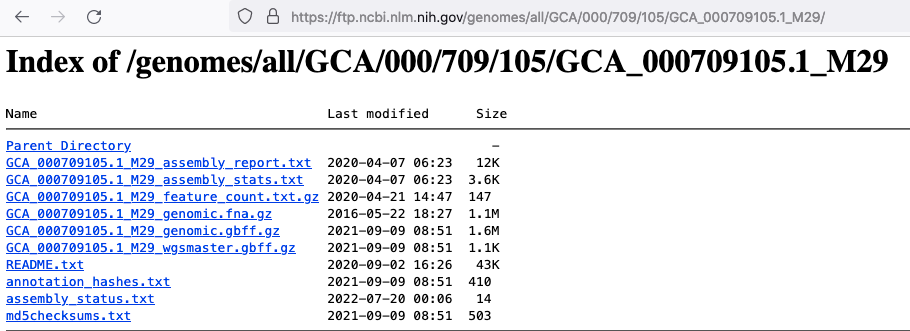
For a particular assembly it gives a path to an ftp site, like  https://ftp.ncbi.nlm.nih.gov/genomes/all/GCA/000/709/105/GCA_000709105.1_M29, and inside that ftp site we can see lots of files for that assembly:


Finding V. cholerae assemblies on the NCBI website

Note that another way to search for Vibrio cholerae assemblies in the NCBI, is to go to the NCBI website and choose 'Assembly' as the database to search and search for "Vibro cholerae"[ORGN]. This finds 4595 assemblies (with filters activated: Latest, Exclude anomalous), as of 21st July 2022. There is a little summary on the left of the webpage that will say something like this:

I'm not sure why we get 4595 assemblies on the website but 4602 on the ftp site. I think it might have something to do with versions of the assemblies, or some difference in the updating of latest assemblies between the website and the ftp site (?).

Acknowledgements

Thanks to Stephanie McGimpsey for tips on how to find V. cholerae assemblies on the NCBI ftp site.